| Home »
Categories
» Krishand GL |
Error "Jalankan program Microsoft Excel." Saat Impor Jurnal |
|
Article Number: 571 | Rating: Unrated | Last Updated: Mon, Oct 2, 2023 at 10:09 AM
|
|
Error "Jalankan program Microsoft Excel." Saat Impor Jurnal
Pada saat melakukan proses impor jurnal di dalam aplikasi Krishand GL tampil message error seperti pada gambar :
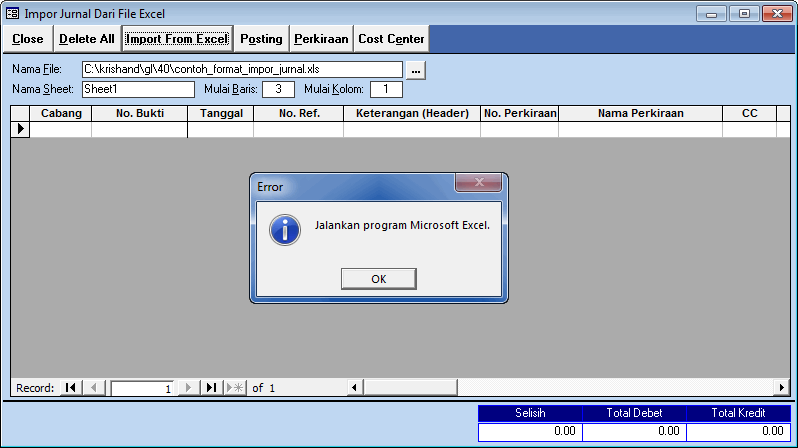
Hal tersebut terjadi karena :
- Saat proses impor tidak ada file excel yang terbuka.
- File excel yang dibuka tidak compatible.
Solusi dari penyebab pertama :
- Buka file excel yang akan diimpor atau file excel kosong, lalu lakukan kembali proses impor jurnal di dalam aplikasi Krishand GL.
Solusi dari penyebab kedua :
- Aktifkan compatibility mode pada Microsoft Excel.
|
Posted by: nur - Mon, Oct 2, 2023 at 10:09 AM. This article has been viewed 734 times. Filed Under: Krishand GL |
Attachments 
There are no attachments for this article.
| | Related Articles 
Menu Rasio Keuangan
Viewed 524 times since Fri, Dec 6, 2024
Perbandingan Krishand GL 3.0 dengan 4.0
Viewed 1018 times since Wed, Apr 28, 2021
Tampilan Menu Jurnal Pada Krishand GL
Viewed 2023 times since Tue, Sep 22, 2020
Budget Cost Center di Krishand GL
Viewed 2201 times since Wed, Apr 21, 2021
Objek Pajak di Program Krishand GL
Viewed 1292 times since Mon, May 24, 2021
|
|

 Subscribe to Article
 Print Article
 Email Article to Friend
 Export to PDF
 Export to MS Word