Home
|
Search
|
News
|
Glossary
|
Ask Question
|
Login
Krishand Support
Home
»
Categories
»
Krishand Payroll
»
How to ...
Materi Workshop Krishand: Langkah Penting Rekonsiliasi PPh 21 Menjelang SPT Masa Desember
Article Number: 615 | Rating: Unrated | Last Updated: Tue, Dec 16, 2025 at 4:29 AM
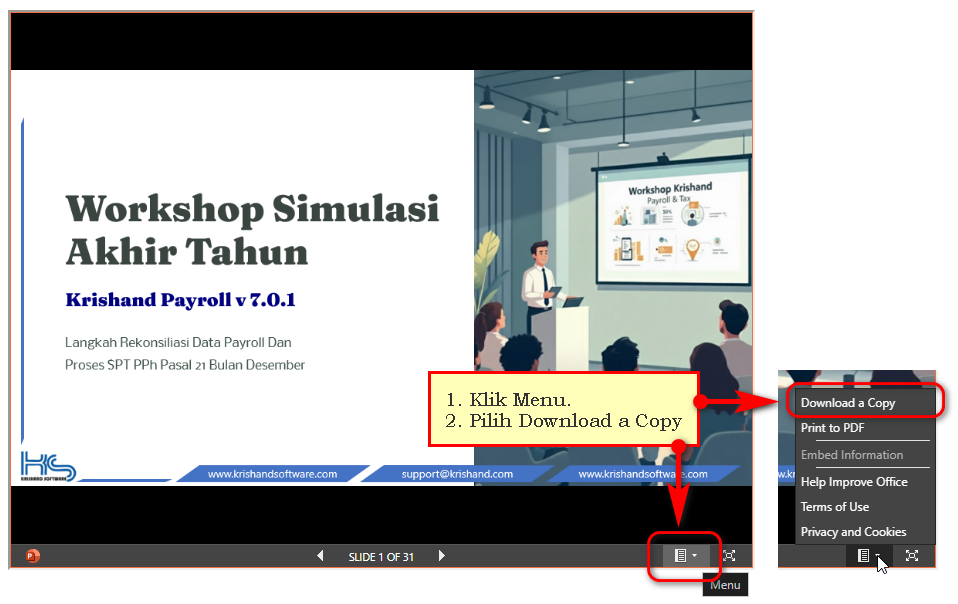
Untuk download slide lihat pada gambar atau video di bawah.
Custom Fields
Software:
Payroll
versi:
7.0.1
Posted by:
lia
- Mon, Dec 15, 2025 at 4:30 AM. This article has been viewed 1674 times.
Filed Under:
How to ...
Attachments
There are no attachments for this article.
Comments
There are no comments for this article. Be the first to post a comment.
Add Comment
Name
Email
(Required, but not published)
Comment
Security Code
Related Articles
Cara Mengubah No NPWP Pegawai Pada Formulir 1721-A1 Tahun Lalu
Viewed 1887 times since Fri, Jan 21, 2022
Bagaimana Cara Setting Perubahan Tarif JKK (Jaminan Kecelakaan Kerja - BPJS Tenaga Kerja) di Krishand Payroll?
Viewed 4508 times since Sun, Oct 18, 2015
Bagaimana cara menambah komponen gaji ?
Viewed 5463 times since Mon, Jun 16, 2014
Bagaimana cara mengubah logo perusahaan ?
Viewed 3956 times since Fri, May 30, 2014
Bagaimana cara mengubah ukuran kertas pada saat preview laporan ?
Viewed 5830 times since Mon, Jun 16, 2014
Apakah perbedaan Proses Gaji dengan Proses Tutup/ Buka Periode ?
Viewed 9788 times since Wed, Sep 3, 2014
Bagaimana cara membuat formulir 1721-A1 untuk pegawai resign yang keluar di awal atau di tengah tahun ?
Viewed 8604 times since Tue, Aug 19, 2014
Bagaimana Cara Ekspor Data Bruto & PPh 21 Pegawai Tetap, Bukti Pemotongan PPh 21/26 Tidak Final & Final dari program Krishand ?
Viewed 16442 times since Mon, May 26, 2014
Bagaimana cara menggunakan fasilitas pembulatan ?
Viewed 4632 times since Tue, Jun 24, 2014
Cara Memasukkan Penghasilan Bruto dan PPh 21 Pegawai Tetap Ke Dalam Menu SPT Masa PPh 21 dan 26
Viewed 1888 times since Thu, Apr 7, 2022
Subscribe to Article
Print Article
Email Article to Friend
Export to PDF
Export to MS Word
0
(
0
)
Article Rating
(No Votes)
Rate this article
Select One
5 - Excellent
4 - Above Average
3 - Average
2 - Below Average
1 - Unhelpful
