
Home » Categories » Krishand Payroll » Trouble-shooting error

Error “Function is not available in expressions in querry expression” Saat Login Krishand

Error “Function is not available in expressions in querry expression” Saat Login Krishand


Jika pada saat login program krishand Payroll terjadi error dengan massage error seperti di bawah ini:
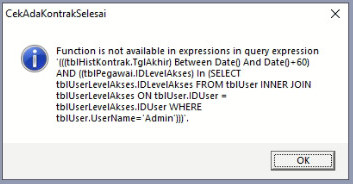
 

Hal tersebut terjadi disebabkan karena file Jet4 pada komputer bermasalah

Cara mengatasi error tersebut dengan langkah sebagai berikut :

1. Download Jet4 dari link krishand atau download dari internet
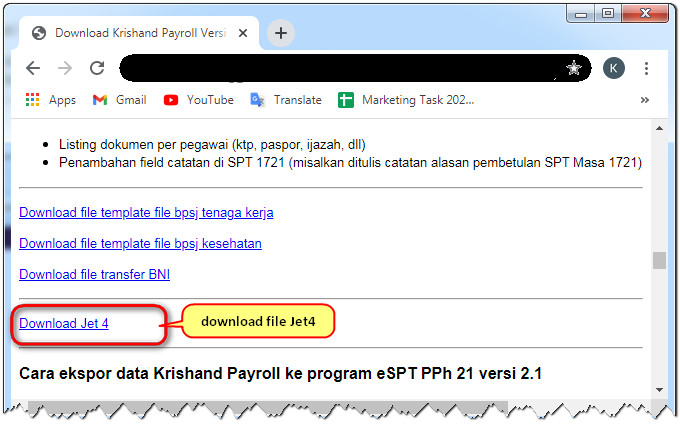
 

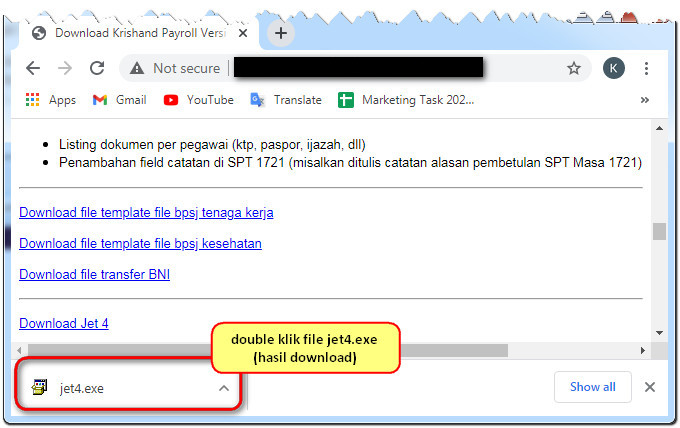
2. Jalakan / Double klik file hasil download, jet4.exe 
 

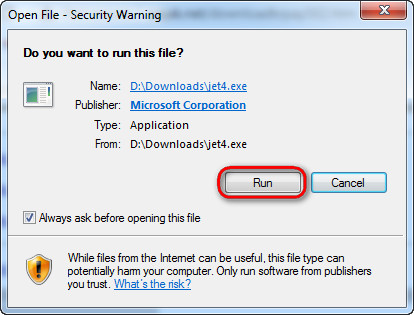
 3. Pada security warning klik tombol run 
4. Klik yes pada windows license agreement 


Login kembali ke program krishand payroll, maka program sudah bisa di gunakan 


Attachments Attachments
There are no attachments for this article.
Related Articles RSS Feed
Error “2340-The expression you entered exceeds the 1,024-character limit for the query design gird.”
Viewed 774 times since Fri, Jun 14, 2024
PT Krishand Indonesia Muncul Saat Login Setelah Update Krishand Payroll? Ini Cara Mengatasinya
Viewed 22 times since Wed, Aug 26, 2026
Tidak Dapat Koneksi Database Ke Tahun Sebelumnya
Viewed 575 times since Thu, Sep 26, 2024
Data Penghasilan Pegawai Tidak Tampil Pada Laporan Daftar Penghasilan Bulanan (Excel Format)
Viewed 624 times since Wed, Jan 15, 2025
Error " The Expression On Click ... : The field is too small to accept the amount of data you attempted to add. Try inserting or pasting less data. "
Viewed 4145 times since Thu, Jul 17, 2014
Error: "Microsoft office access has stopped working. A problem caused the program to stop working correctly. Please close the program" .
Viewed 10582 times since Mon, Jul 21, 2014
The drive or network connection that the shortcut Krishand .....refers to is unavailable. Make sure that the disk is properly inserted or the network resource is available, & then try again.
Viewed 4095 times since Thu, Jun 26, 2014
Tidak Dapat Membuka Program Krishand
Viewed 2719 times since Mon, Jan 30, 2023
Error " The Expression On Click ... : License information for this component not found. You do not have an appropriate license to use this functionality in the design environment. "
Viewed 4301 times since Thu, Oct 22, 2015
Impor Bukti Potong PPh Dari File Excel Berhasil Tapi Tidak Terbentuk
Viewed 464 times since Mon, Jun 24, 2024